APPlying APPtitude – Feedback Response

Week of the 6th May – Independent Study 

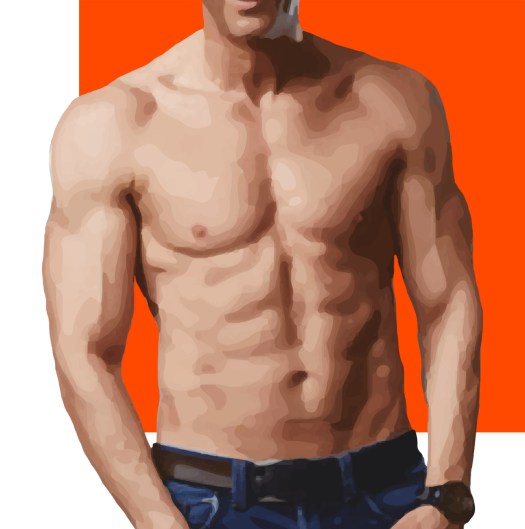
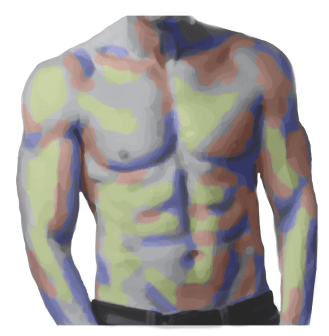
The feedback was very positive with only a few tweaks that I had to make. The main issue being the logo. I struggled to improve this and was really unsure on what way I wanted to go down. This included looking back at my very first sketches, which are very basic but they gave me incentive to stick with the idea that I had with using the body but refining it.

To do this I started with the logo of just the body and added a few layers that softened the design but this was still not right. I added background colours and still the image was not quite right.

Overcoming this I got the original person in colour and played around with backgrounds. I feel this last design although simple showcases the traits of the app precisely. This is because the lines are crisp and detailed. along with the back ground not fully taking hold of the space, meaning it is different from the mainstream.

logo.2.jpg

APPlying APPtitude – Feedback

Tuesday 7th May – Presentation + Feedback

We were only allowed 3 minutes to show off our app in our presentations. Due to me being flustered I ran over time and was unable to show off all my app. When listening back to the recording I noticed myself saying the same points over and over again. So to over come this in the future I will note 5 or 6 different points and go though each one starting with the most important so that if I ramble on too much I can cut out the less important last points. Another way to cut this down is to have only one or two slides in the build up explaining the ideas then go straight into showing off the final piece – where I can talk over and explain the steps.

The feedback for the app itself was very positive with comments on how the concept is really funny and can be seen within the industry and the group can see themselves or others using it. They liked the off kilter idea and the brighter colours along with the personalisation. The tutor mentioned how ironic the changing of the nipple size was as it is so pointless but the users would love it.

Screenshot 2019-05-18 at 19.36.29

However the main factor that I need to change is the logo. This looked rushed and as if it was done by someone else just copying the style. At first I thought by having a black and white design with highlighted areas this will exaggerate the idea of wanting the perfect body. However this has not paid off as it just looks off.

APPlying APPtitude – Refinement

Week of 29th April – Independent Study

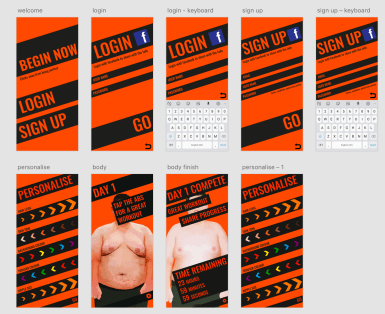
When creating the first video I realised that there was no real progress so I then made a second day video to show more usage of the app. This allowed me to show off the notifications that I had created as well as some more personalisation abilities.

Finally to be ready for my short presentation I made a short powerpoint showing how I got to my final piece with the ending being my 2 videos.


APPlying APPtitude – Initial Feedback

Monday 29th April – Studio Support + Independent Study 

Screenshot 2019-05-08 at 17.59.45

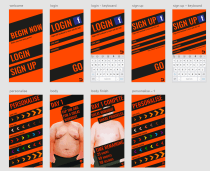
From looking at my designs it was suggested that you cannot truly see the app being used at its full potential. This meant that I had to make the app more useable; however, I struggled to make the app function like it would if it was in a commercial use. So to over come this I would need a story line and each button pressed in the right sequence to give the appearance of a fully functioning app.

Screenshot 2019-06-01 at 13.31.50.png

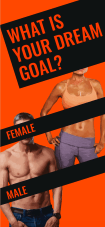
On top of this it was suggested that there is only a male point of view with the app, which is what I initially wanted. It was said that it is excluding a whole potential market so I should add in an option of having women as an option as well. However, this would mean I would have to create a whole another body and video of using female and then add in the option to the personalisation part, which would be time consuming and I was still not convinced by the idea. So moving forward I created a simple page at the start that asks the user if they would want a female form or male.

Talking with the tutor we went back to the basics of my idea as to where you show off your “(screen) body” to all your friends. My designs so far were missing a critical factor being the sharing part. For this I added the section where the user can share on many different sites their own progress, thus completing my initial idea.

To complete the app for the first use I wanted to app a mini timer of the time counting down to the next tap of the day. This was incredibly easy once I learnt how XD worked. For this each art board has a timer that moves across to the next second.

APPlying APPtitude – Refining XD

Easter work– Independent study

Screenshot 2019-05-08 at 17.59.45

From all the work I’ve done so far was very basic and I know that I need to do a lot more with the personalisation and usability but I am unsure of how to make it functioning like a real app as there are so many outcomes with the personalisation page and the progress of each day. So over Easter I have congregated all the work and improvements into my app ready to get feedback from the tutors and my peers to show me where to go.

Screenshot 2019-05-18 at 17.43.23.png

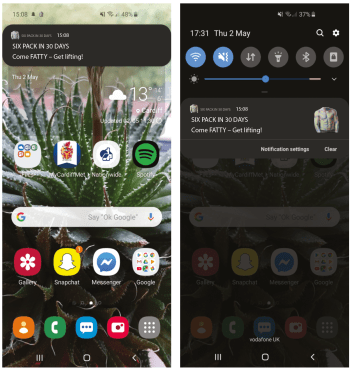
Another part I decided to add was a notification system for when someone forgets or just needs a reminder that they can tap the app once more. From using my own phone system I was able to design a somewhat realistic notification.

Screenshot 2019-05-04 at 13.59.52

For this it needed a logo so from looking at the previous research many had the cartoon final aesthetic that the users would ideal want. I used this a a reference point and created a very basic logo, with the final progress of the body within the app.

Screenshot 2019-05-18 at 19.36.29.png


APPlying APPtitude – Using Xd

Weeks around the 1st of April – Independent study

From the workshop in the pervious week I was able to create a very basic looking app. I designed the elements within Adobe Illustrator, then placed them into XD which had all the links on.

My designs were an on going process which used Illustrator along side Xd so that I could see how the design would work within the context of an app. This lit up the problem that the body cannot be seen well enough and isn’t a good enough representation of the person as well as the previously mentioned overcrowding of personalisation art board.

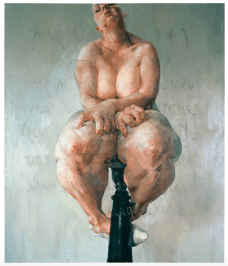
Through talking through with a tutor it was mentioned that an artist called Jenny Saville had a unique take on the body. Her take on the body was to pick out imperfections and what the public has made taboo and encapture those to reconstruct the human flesh, informing others on her perception of the body. Her view being that the body is practical with its resilience but is also its fragility seen from some of the rips and tares within her art work.

Screenshot 2019-05-09 at 15.11.50.pnghttps://gagosian.com/artists/jenny-saville/

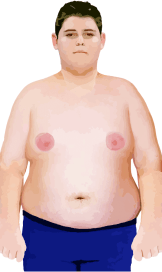
From Saville’s work I was inspired to use an almost photographic cartoon, painted style.

However, as I need one person’s progress from a larger size to the “perfect body” I needed to use resources from the internet. I looked at many websites to find the right style of person I could use as well as the ability to use their photos within my work.

https://www.thesun.co.uk/fabulous/5062639/remember-biggest-loser-winner-sam-rouen-sexy-fireman-10-years-on-from-show/

https://www.shapeplus.com/results/never-thought-id-guy-writes/

https://www.express.co.uk/life-style/diets/805718/weight-loss-transformation-myprotein

https://www.amazon.com/How-To-Get-Toned-Women/dp/B00OZXYQEE

Screenshot 2019-05-07 at 09.16.56From these websites I was able to create a base/start look and a final look. I used the image trace tool for the cartoon style and photoshopped the body parts together. This allowed me to make the personalisation elements such as the nipple size, trouser colour and so on. This also helped for when I had to make the person smaller as the app progressed.

APPlying APPtitude – Digital Progress

Week of the 1st of April – Studio Support + Independent Study

Screenshot 2019-05-06 at 16.24.35

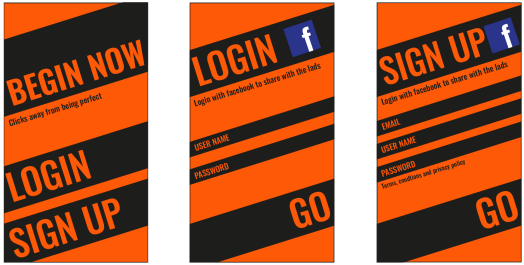
Creating the next two designs were easy as I used the first page as a template, copying the font, colours and aesthetics.20190506_163006

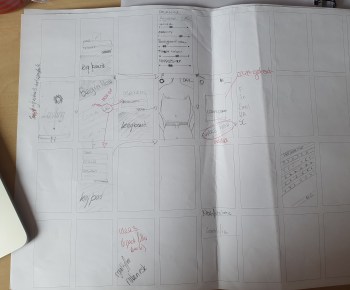
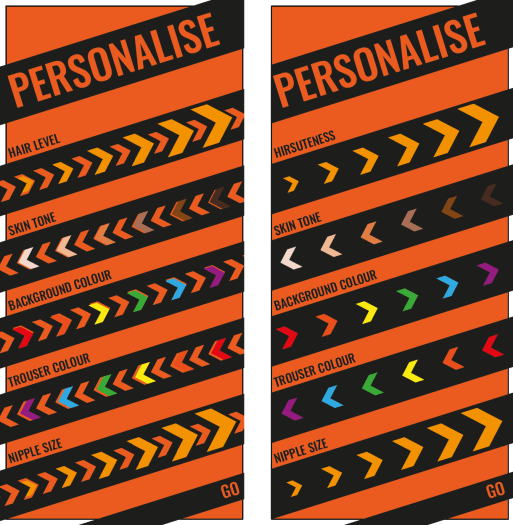
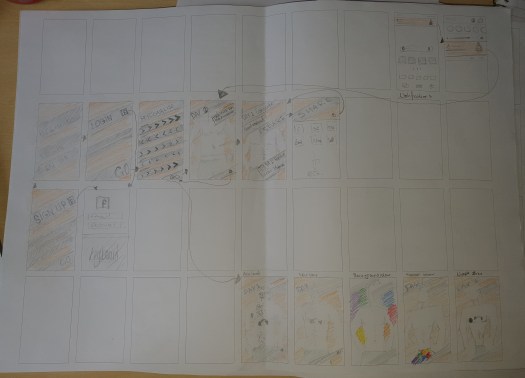
Moving on from this was a struggle but from the quick yet detailed workshop I was able to draw and map out my ideas for each page. This is called the wire frame. My first draw up had some issues including coherence. The initial digital design was not seen through out the app. This meant that I had to rethink the aesthetics of the rest of the app or the first page. To over come this I decided to draw some more designs that included the style of the first pages. Through redrawing the design several times it managed me to think through smaller details that I wouldn’t have thought of the first time from drawing such as the personalise page, where I changed the style of the slider/ button style. 20190506_163057

I wanted to keep the wonky style with sharp lines but wasn’t sure on how to physically make the interactive part slide. So I thought that buttons could be easier to create and work with the software we’ve got.

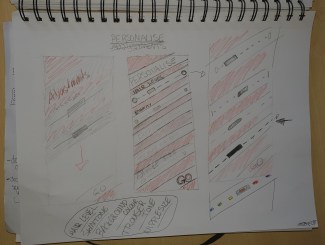
I knew that I didn’t want a simple design that would just be very basic lines so to upgrade this I changed the dash lined design from the drawing to the slightly different chevrons. These first didn’t show the range of the personalise parts so I added extra ones on top that had the traits within the design so that they function. However, through showing this to peers and tutors they though I needed to keep it simple. From the feedback I just removed the back detail, which added negative space balancing out the details.

Screenshot 2019-05-06 at 19.54.45

20190506_163029


APPlying APPtitude – Digital Visuals

Week of 25th March – Independent study 

20190504_171207Through using the ruff sketches I managed to create a simple design that used only two colours. I started with black and white to perfect the silhouette and the overall design. I began to use lowercase letters but I felt that the design needed to be more crisp and some how more bold. From this I decided to make the main parts capital letters for extra impact/ ‘power’.

I experimented with the look of the raged edges compared to the crisp edges, through showing my peers it was stated that the ragged edges made the design lose the urban and contemporary feel so ended with the crisp sharp edges that can almost represent the sharp angles of ideal body.

I most like the wonky and off centre designs as it is almost a metaphor for the app being out of the mainstream/ wonky, almost insulting the classic perceptions of what we should ideally look like.

I struggled to find the right colour scheme but through trying many different colours and a little research I decided upon orange. This colour can be seen as energetic and warm as well as representing the sun which shows power. This paired with the black gives a sense of aggression and rebelling whilst still being sophisticated.


APPlying APPtitude – Visual Ideas

Week of the 25th April – Independent Study/ Review Initial Visuals

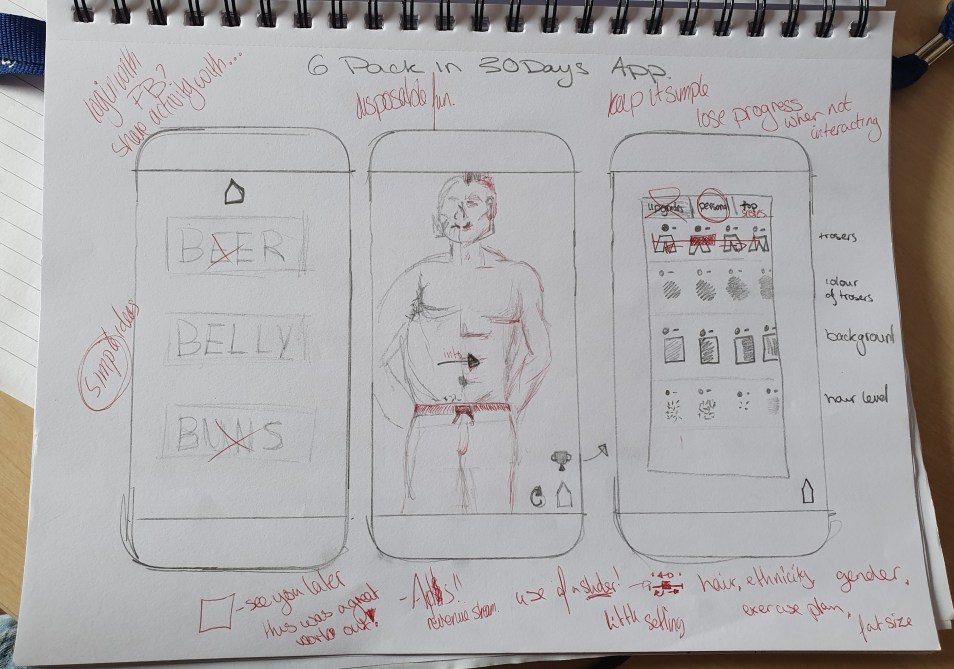
For the idea I first thought about having 3 different types of 6 packs, such as beer, abs and so on. however, when telling other about this they said that it would not work as the design needs to be simple and almost as if the app is a one liner.

20190503_142049

I then thought about that the users should be able to personalise much like the app I downloaded, but this would change colour, tones and to make the person more human and seem like the user or the user can make up a dream look for them. I initially want a slider for this as the user can get more of a range of personalisation, but I’ll have to figure out how Xd will allow this.

I knew I wanted darker tones so I began to sketch up some ideas with colour pallets. I sketched up ideas of the first page so that I can just get the design idea to copy across the rest of the design. Through this process I realised that the design doesn’t need more than two or three colours so as I sketched more I lost more and more colours as well as details. I lost like the look of the second page of designs, which just have straight lines with strong angles. This design should fit in well with the target audience of younger men, due to it being modern, easy to navigate and had an urban feel.

APPlying APPtitude – Research

Week of the 25th March – Independent study 

Moving on from choosing the app idea, I needed to look into what style choices are out there. I opened up the app store and simply searched for 6 pack in 30 days. A lot came up and the style was always very similar, with the red tones broken up with the back and white cartoon styles. 

Next to get a better idea of how an app like this would function and what style choices would be made, I downloaded an app called six pack in 30 days.
Screenshot 2019-05-04 at 13.59.52

The logo includes a very stereotypically masculine colour scheme. the colours represent blood and power, making the user think that they are those things. I want to use this within my own app but more tricking the user so that they want to show off their app instead of the users own abs.

The app itself was extremely basic. It loaded quickly with a man’s body, which I assume is what the end goal should supposedly be. I’m not sure if I like this as it is extra time wasted on loading and I feel that my target audience would not want to spend an extra few seconds on waiting as I feel they would most likely get bored if it was a constant thing.

This loading page went on to what training plan I wanted and onto each days training plan. Within the days it included what was needed to do which increased as each day progressed. On top of this it had a side panel that almost makes it personal with reports, plan options and reminders. For my own app I could personalise it with different sizes or colours so that each user has a different experience.

One this this app isn’t is cohesive. The logo is cartoon, with red and dark tones; whereas, within the app it uses photography with a blue and lighter tones. I feel that I can create something more cohesive, which includes either just photography or cartoons.

I’m thinking of just having a darker colour scheme of only a few simple bold colours, maybe black, white and a more masculine urban colour, like red, electric blue or a harsh orange. This should be an improvement from the exciting app as the photos use the darker more sinister tones that doesn’t at all work with the cool blue almost peaceful tones.


Design a site like this with WordPress.com
Get started